California workers' comp billing for med-legal & treatment
MindBill
MindBill vs. daisyBill Independent comparison

The best daisyBill
alternative? MindBill.

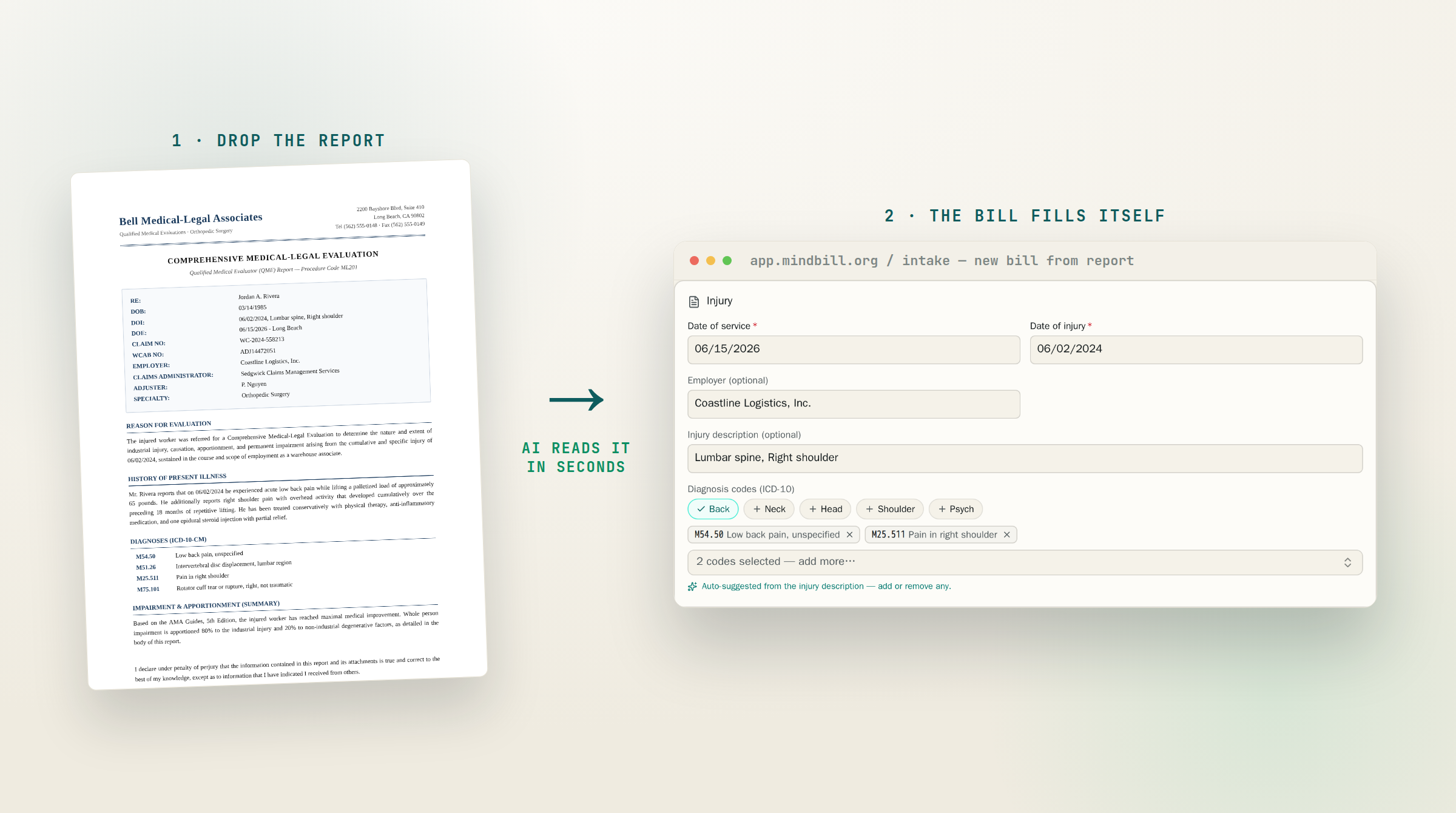
Because the fastest bill to send is the one your team doesn't have to retype. MindBill reads the report, enters the bill, and shows its work—ready for review in about 10 seconds.

15 minutes · Bring a report · No slide deck

Report → bill
MindBill intake screen showing a report converted into bill data
AI prepares the bill
Report in. Bill ready.
Keep

Same clearinghouses. Same billing rules. Less busywork.

Lose

Retyping reports, disconnected software, slow support queues

What changes on Monday morning.

Your team keeps control of every bill. MindBill takes the repetitive first pass off their plate.

01 / REPORT

Drop in the final report.

MindBill reads patient, case, provider, service, and report details without making a biller type them again.

02 / READY

AI builds the bill in about 10 seconds.

It suggests billing codes, required modifiers, and page counts, then shows why it chose each one.

03 / REVIEW

Your team reviews and sends.

Correct anything that needs judgment, send the bill through the same California billing system, and keep moving.

04 / FOLLOW-UP

MindBill helps close the loop.

MindBill reads the payer's payment explanation, flags possible underpayments, and prepares the second-review form.

Side-by-side comparison

The difference,
at a glance.

Both platforms send and track California workers' comp bills. MindBill also takes on the repetitive work before and after you send them.

Comparison of daisyBill and MindBill workers' compensation billing capabilities
What matters daisyBill MindBill
Send and track workers' comp bills Yes.Included Yes.Included
Build a bill from the final report No.Staff enter or import details Yes.AI prepares it
Suggest codes, modifiers, and page counts from the report No.Rules checked after entry Yes.AI suggests and explains
Show where each bill detail came from No.Not included Yes.Source shown for review
Automatically flag underpayments and prepare second review No.Staff prepare follow-up Yes.AI flags and prepares
Connect with your current practice software Yes.Files or software connection Yes.Two-way connection
Get direct support 24/7 No.Weekdays, 9–6 ET Yes.Direct founder support
Run both systems side by side while switching Not publicly stated.Ask about onboarding Yes.Included
No extra fees for each user or provider Current pricing is not public.Ask for current pricing Yes.Included

✓ Included  ·  × Not included  ·  – Ask the vendor

daisyBill information verified against its public billing software, software connection, and help center pages on September 3, 2026. Product capabilities and pricing can change; verify current terms with each vendor. daisyBill is a trademark of its respective owner. MindBill is not affiliated with or endorsed by daisyBill.

01 / Before you send the bill

Start with the work that happens before you send the bill.

Both platforms can send workers' comp bills electronically and track the payer's response. The larger day-to-day difference is what happens first: how the final report becomes a complete bill.

With daisyBill, staff can enter the bill or bring billing details over from another system. With MindBill, staff upload the final report, let AI pull out the case and service details, then check the suggested billing codes, required modifiers, page counts, and the reason for each choice. That matters most when billers are still reading one report and typing the same facts into another system.

02 / After the response

Measure what happens after the payer responds.

Sending the bill is only the midpoint. A useful comparison should include whether the bill was accepted, how much the payer allowed, whether the payment appears short, and how much work it takes to request a second review.

Both products support payment follow-up. MindBill reads the payer's Explanation of Review (EOR), compares the payment with the expected amount, and prepares the second-review request form (SBR-1) for staff to check. The value is not another status screen; it is reducing the manual work between noticing a short payment and acting on it.

03 / Working with your other software

Can it work with the software your team already uses?

daisyBill can receive bill information from other software or uploaded files. MindBill can also connect with your existing electronic health record, practice software, or internal system—and send billing updates back to the place your team already works.

Ask each vendor to demonstrate your exact workflow: where the report starts, what information moves automatically, what happens when something is missing, and where your staff will see the latest payment status.

04 / Switching systems

Ask exactly how the switch will work.

The safest switch matches your providers, billing numbers, billing rules, documents, and connected software before the old workflow disappears. MindBill runs both systems side by side during setup, so your team can compare results and fix unusual cases before making the switch.

A serious switching plan should name who is responsible, test real bills, explain what happens if something goes wrong, and make clear which old records will move. Ask for that plan before choosing either platform.

05 / Which fits?

Choose based on what is slowing your team down.

Keep daisyBill if

Your current workflow is working, your team is comfortable with it, and entering reports or connecting to other software is not slowing you down.

Consider MindBill if

Your team spends time retyping reports, chasing underpayments, or keeping billing connected with other software—and wants AI to prepare the first draft for staff to check.

Test the difference on one report

The questions behind the search.

Will we lose our existing billing workflow?

No. MindBill uses the same electronic billing routes your team already relies on for California workers' comp med-legal and treatment bills. We run both systems side by side while your account is set up.

Is the AI making final billing decisions?

Your team stays in control. MindBill prepares the bill, shows what it pulled from the report, and explains why it chose each billing code so staff can check everything before sending.

How is MindBill priced?

MindBill charges for each bill submitted, with no separate subscription or extra fee for each user or provider. We quote based on your volume.

Can MindBill connect to the software we already use?

Yes. MindBill can connect with electronic health records, practice software, and internal systems. During the demo, we will walk through what your team uses and how the information should move.

The fastest way to compare

Bring one report.
Watch MindBill build the bill.

No hard sell about switching. No generic presentation. Just your real billing process in 15 minutes.

Book the 15-min demo